
Earn Free CE Certificates with edWeb
Earn free Continuing Education (CE) Certificates for participating in edWeb's live or recorded presentations.
Each qualifying program earns you a CE Certificate for one clock hour of professional learning.
New to edWeb? Join for FREE. Already a Member? Log in to get started.
How to Earn & Access Your CE Certificate
Complete these three requirements:
-
- Watch the program, live or recorded, for at least 40 minutes. It takes up to 24 hours after viewing for the webinar to be listed on your transcript page.
- Pass the Continuing Education (CE) Quiz: receive a score of 70 or higher. You can retake it if needed.
- Submit the Professional Learning (PL) Plan: answer 3 short reflection questions about the program and give it a star rating.
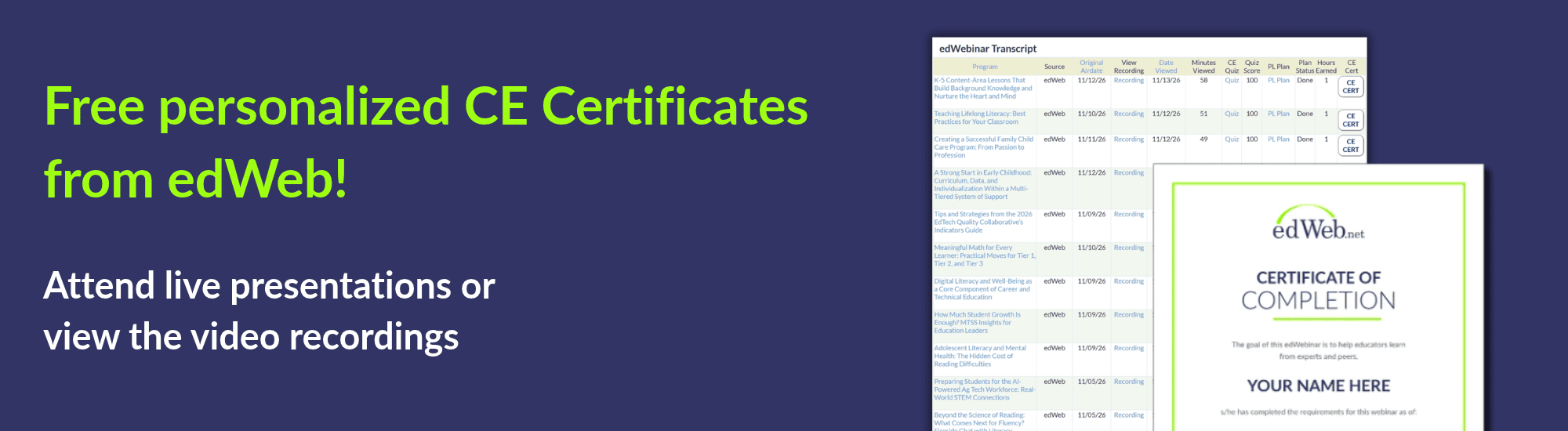
Once your edWeb Member Transcript shows all three complete, your CE Certificate is generated overnight. Please allow up to 24 hours after each input for your records to update.
The next day, a CE CERT button appears next to that program. Click it to open your certificate as a PDF in a new tab, where you can download or print it.
Don’t see your certificate?
-
- Check your transcript for Minutes Viewed of 40+, a Quiz Score of 70 or higher, and a completed PL Plan Status. Allow up to 24 hours for these to update.
- Clicked the CE CERT button, but nothing opened? Turn off your pop-up blocker.
- Missing minutes? Add every email address and phone number you use to your edWeb member profile so all your records are linked.
- Still stuck? Email help@edweb.net.
Please Note: CE Certificates are awarded only once per program.
New in 2026: The CE Quiz and PL Plan are required for programs viewed on or after January 1, 2026.
These steps give schools, districts, and states clear evidence that edWebinars support effective professional learning and improve teaching and student learning.
Where to Find the Recording, CE Quiz, and PL Plan
You can get to all three in either of these places:
-
- edWebinar Archived Recordings (fastest): Find the program, then use the Recording, Quiz, and PL Plan links in its row.
- edWeb Member Transcript: Your viewing record appears within 24 hours of watching. Once it does, use the Quiz and PL Plan links in the program’s row.
Please note: Your transcript updates overnight. After you finish, allow up to 24 hours for your minutes viewed, quiz score, and PL Plan status to show.
About edWeb Approvals
Each state, district, and professional organization decides what counts toward its own requirements.
See how edWeb is approved:
K-12 Educators: State approvals map
Early Childhood Educators: Early childhood approvals
Professional Association Members: Professional association approvals

Register for Live edWebinars
View the calendar of upcoming webinars here.

View Archived Recordings
Watch edWebinar recordings here.

Not yet an edWeb member? It’s Free!
Join edWeb to get your CE certificates here.